
Set it up
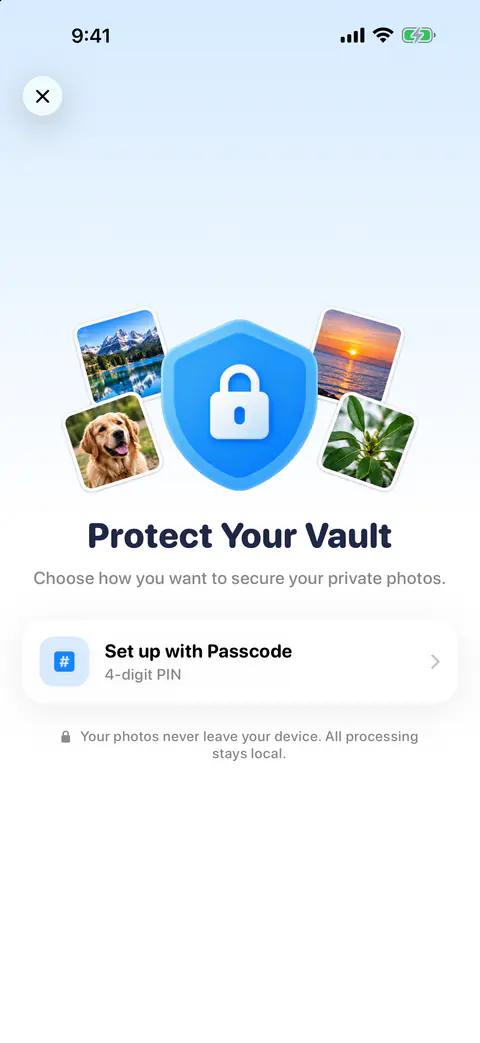
Open You and tap Vault. Keepable has three tabs, Swipe, Clean and Compress, and a You screen for your stats, plan, vault and settings. The first screen asks how you want to lock it. You protect the vault with Face ID or Touch ID, or a 4-digit passcode. Choosing Face ID also has you create a backup passcode.
Once it is set up, you can fill it from your library or straight from the camera. You can take a photo or record a video straight into the vault, add from your library, and export items back to Photos.
How the photos are protected
Vault photos are saved inside Keepable with iOS’s complete file protection, which keeps them encrypted on the iPhone and unreadable while it is locked. That is the iPhone’s own Data Protection, not a lock the app made up.
Apple’s security guide explains what that class does: shortly after the device locks, the key is thrown away, and the data can’t be read until you unlock it again with your passcode, Face ID or Touch ID (Apple Platform Security).
What happens to the photo in Photos
Putting a photo in the vault doesn’t have to remove it from Photos. You choose what vaulting does in Photos: Delete from Photos, Move to Hidden Album, which is the default, or Keep in Place. You can change it later in You, under Deleting and vault.
- Move to Hidden Album keeps a copy in Photos, out of sight. Apple says hidden photos don’t appear anywhere else in Photos, and the Hidden album is locked by default from iOS 16 on (Apple Support).
- Keep in Place leaves the photo where it was, so the vault holds an extra locked copy.
- Delete from Photos leaves the vault as the only copy. Read the next section before you choose it.
The catch: this iPhone only
Photos in the Vault are kept only on this iPhone. They aren’t in iCloud Photos, and deleting Keepable deletes them. The warning comes up the first time you choose Delete from Photos, with the Hidden album offered as a way out.
The rest of the app works the same way. Keepable keeps its index, settings and vault on the iPhone and uses no iCloud sync. Its only special entitlement is an app group shared with its widgets. So if your iPhone is lost, reset or replaced, the vault does not come with you. Before you change phones, export what you want to keep back to Photos.
If you mostly want photos out of sight, the Hidden album may suit you better: Apple says that with iCloud Photos, photos you hide on one device are hidden on your other devices too (Apple Support).
If you forget the passcode
If you forget the vault passcode you can reset it with Face ID, or, if Face ID is unavailable, erase the vault and start again. Erasing can’t be undone, which is one more reason to export anything precious.
What the vault does not do
- It doesn’t add a cipher of its own. The protection is iOS’s, as described above. Vault photos are saved inside Keepable with iOS’s complete file protection, which keeps them encrypted on the iPhone and unreadable while it is locked.
- It doesn’t sync. Keepable keeps its index, settings and vault on the iPhone and uses no iCloud sync. Its only special entitlement is an app group shared with its widgets.
- It isn’t free. The vault is part of Keepable Pro. Without Pro, a vault that already holds photos stays open but read-only. The free and Pro page shows what else Pro adds.
Where Keepable helps, and where it doesn’t
It helps when a photo should not sit in Photos at all, even hidden. You choose what vaulting does in Photos: Delete from Photos, Move to Hidden Album, which is the default, or Keep in Place.
It helps when you want the camera to save straight into a locked place. You can take a photo or record a video straight into the vault, add from your library, and export items back to Photos.
It doesn’t protect against losing the phone itself. Photos in the Vault are kept only on this iPhone. They aren’t in iCloud Photos, and deleting Keepable deletes them. For photos you can’t lose, a backup comes first; see back up photos before a clean-up.
Questions and answers
Are vault photos backed up to iCloud Photos?
No. Photos in the Vault are kept only on this iPhone. They aren’t in iCloud Photos, and deleting Keepable deletes them. Export anything you can’t lose before you change or reset your iPhone.
What happens to my vault if I stop paying for Pro?
The vault is part of Keepable Pro. Without Pro, a vault that already holds photos stays open but read-only.
What if I forget the vault passcode?
If you forget the vault passcode you can reset it with Face ID, or, if Face ID is unavailable, erase the vault and start again.
Sources
What this page says about Keepable was checked against the app on .
- Apple Platform Security, Data Protection classes — what Complete Protection does when a device is locked, read 13 Nov 2026
- Apple Support, Hide photos with the Hidden album — what the Hidden album does, its Face ID lock, and hiding across devices with iCloud Photos; dated 16 March 2026, read 13 Nov 2026
Get Keepable
Keepable is free to use every day, and Keepable Pro is an optional upgrade.