
Why similar shots are the bigger pile
The Duplicates collection deals with copies. Apple says Photos “detects duplicate photos and videos” and gathers them there, but never says it collects shots that only look alike (Apple Support). So the three takes of the group photo, the four angles of the birthday cake and the ten nearly identical sunsets stay where they are.
That pile is usually far bigger than the true copies. Each time you tap the shutter twice to be safe, you add one. Nobody goes back to choose.
Clear them one day at a time
This works in Photos alone and needs no app (Apple Support, iPhone User Guide):
- Open Photos with Library selected. Tap Months to jump to the time you want, then go back to the full grid.
- Tap the Sort and Filter button and choose Captured, so photos sit in the order you took them.
- In Sort and Filter, tap View Options, then Zoom In. Bigger thumbnails make near-identical shots easy to spot.
- Find a run of look-alikes. Pick the best one in your head first.
- Tap Select, then tap the others, or slide your finger across them.
- Tap the Trash button and confirm. Move on to the next run.
Everything you delete waits in Recently Deleted for 30 days, so a slip can be undone.
Keep a pace you can finish
One month at a sitting is a good size. Start with the last big event, a trip or a party, where the piles are tallest and the memories freshest. A whole year in one evening ends with tired, poor choices. If choosing is the slow part, the guide on picking the best photo from similar shots gives a four-check method.
Jump straight to the piles
Search finds the scenes people shoot over and over. Photos search accepts a category such as beach or sunset, a place, a date, or an event such as a concert (iPhone User Guide).
| Search for | What usually piles up |
|---|---|
| sunset | The same sky, a minute apart |
| beach | Group shots, retaken until everyone looked |
| food | One plate from three angles |
| A pet’s name, if you named it in Photos | Dozens of nearly the same pose |
| A city you visited | The landmark from every step of the walk |
In the results, tap Sort and Filter, then Captured, to line the shots up by time. Tap Select to pick the extras, then delete them as above.
Look-alikes that need care
Some similar shots are not spares:
- Different moments. A jump and the landing look alike as thumbnails. Keep both if both matter.
- Edited versions. A copy you edited may sit next to the original. Keep the version you like. The guide on near-duplicates explains how to tell copies apart.
- Bursts. A burst shows as one photo in the grid but holds many. It has its own steps: see delete burst photos.
What a similar-photo finder adds
Doing this by hand works, and costs nothing. What it costs is time: you scroll to find each run, and decide each one. A finder does the scrolling for you. It groups the look-alikes across your whole library and puts a suggested keeper first. The deciding stays with you.
Where Keepable helps, and where it doesn’t
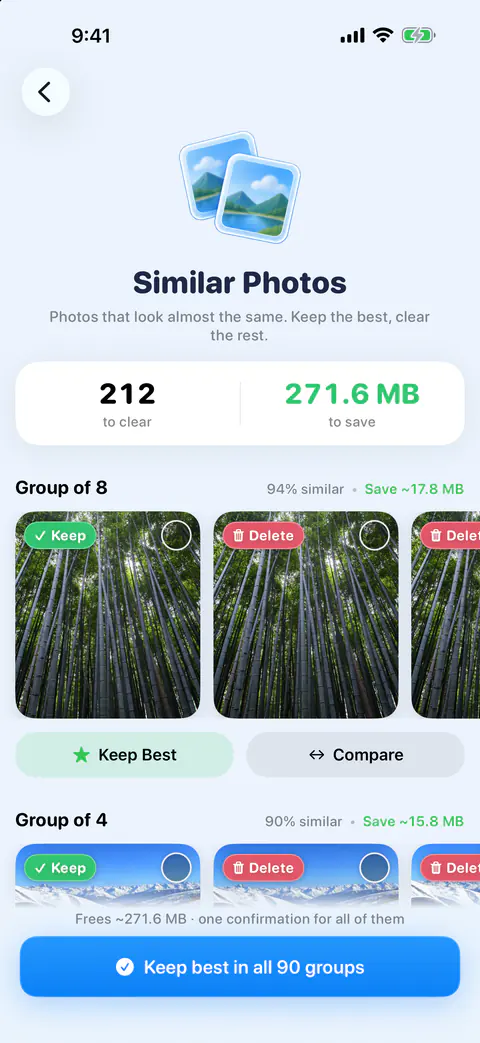
It helps find the runs across the whole library at once. Similar shots, bursts and repeated screenshots. Each set shows its photos in a row with the suggested keeper first, how similar they are as a percentage, and roughly what clearing the set saves.
It helps with the choice. The suggested keeper’s reason is named, such as Highest resolution, Favorite, Edited or Has a location, and for similar shots what the picture shows: Eyes open, Sharpest, Not cut off or Best light.
It helps if you would rather swipe than select. A review pile can also be swiped as a deck with Swipe these, instead of picked from its grid.
It doesn’t clear a set in one tap on the free plan. Keep Best on a set is Pro: it keeps the suggested photo and deletes the rest after you confirm. Free users see a Pro badge on it and can still pick photos in a set to delete, or use Compare.
It doesn’t skip Recently Deleted: what you delete waits there for 30 days, as with Photos (Apple Support). Photos deleted in Keepable go to Recently Deleted in the Photos app. iOS gives apps no way to delete them for good straight away.
Questions and answers
Is there a similar photos album on iPhone?
Not one Apple documents. Photos has a Duplicates collection under Utilities for duplicate photos and videos, and Apple doesn’t say it includes shots that only look alike. Similar shots stay in your library until you sort them.
How many similar photos should I keep?
Usually one per moment. Keep a second only when it shows something the first doesn’t, such as a different person, a different moment or a wider view.
Does deleting similar photos free space right away?
They go to Recently Deleted first, where Apple says they stay for 30 days unless you delete them from there sooner. Empty it when you’re sure.
Sources
What this page says about Keepable was checked against the app on .
- Apple Support, If you can’t find the Duplicates album for duplicate photos and videos on iPhone — what Photos detects, with no definition of a duplicate; published 15 Sept 2025, read 13 Nov 2026
- Apple Support, Browse your photo library on iPhone — Years and Months, View Options with Zoom In (iPhone User Guide for iOS 27), read 13 Nov 2026
- Apple Support, Sort and filter the photo library on iPhone — sorting by Captured, the Media Types filter (iOS 27), read 13 Nov 2026
- Apple Support, Search for photos and videos on iPhone — searching by category such as beach or sunset, by date or place, Select in results (iOS 27), read 13 Nov 2026
- Apple Support, Delete photos on your iPhone or iPad — Select, slide your finger to select, Trash, 30 days in Recently Deleted; published 31 March 2026, read 13 Nov 2026
Get Keepable
Keepable is free to use every day, and Keepable Pro is an optional upgrade.