
Find the Duplicates collection
Since iOS 16, the Photos app looks for duplicate photos and videos on its own and gathers them in one place (Apple Support). The iOS 27 guide calls it the Duplicates collection. Older Apple pages call it the Duplicates album. It is the same thing.
- Open Photos.
- Tap Collections.
- Scroll down to Utilities, then tap Duplicates (iPhone User Guide).
Each row is one set: the copies side by side, with a Merge button next to them.
Merge one set, or every set at once
Apple’s steps cover both (Apple Support):
- To clear one set, tap Merge next to it.
- To clear several, tap Select, then tap Select on each set you want. To clear all of them, tap Select All.
- Tap Merge, then tap Merge [number] Items to confirm.
A good habit: merge one set first and look at what stayed. Then select the rest. On a large library, scroll through the list before you tap Select All, so nothing you care about is in it by surprise.
Where the extra copies go
Photos keeps one copy and moves the rest to Recently Deleted, where they wait for 30 days (Apple Support). Nothing is lost on the first tap. Which copy stays, and what happens to its date and albums, is a longer story: see what Merge does.
Before a big merge, check one setting. If iCloud Photos is on, your iPad, your Mac and iCloud lose the extras too, because a delete on one device happens on all of them (Apple Support). That is usually what you want. Just know it before you tap.
When you are sure, you can empty Recently Deleted instead of waiting. For the short answer, see is it safe to delete duplicate photos?.
If there is no Duplicates collection
Apple gives two reasons (Apple Support):
- Photos found no duplicates. If you don’t see Duplicates, your iPhone has not identified any.
- Photos is still checking. The detection needs the iPhone locked and connected to power. Depending on your library and what else is running, it can be quick or take up to a few days.
To see whether it is still working, open Photos, tap Library, then scroll to the bottom. A status message shows there while your iPhone is indexing. Leave the phone locked on its charger overnight, then look again.
Also check your iOS version. The album needs iOS 16 or later. Still missing? See Duplicates album not showing.
Stop new copies from piling up
Merging clears today’s copies. If they keep coming back, something is making them. The usual suspects:
- A chat app saving every photo it receives. WhatsApp, for one, saves incoming photos and videos to Photos unless you turn it off (WhatsApp Help Center).
- The Duplicate command. It makes a copy that appears next to the original in your library (iPhone User Guide). Handy before an edit, easy to forget after.
- The same photos brought in twice, from a computer, a restore or a shared library. The guide on duplicates after a restore or sync goes through each one.
What the Duplicates collection won’t show
Apple’s pages say Photos “detects duplicate photos and videos”, but not what it counts as a duplicate (Apple Support). Many photos that feel like copies are really separate shots. Each has its own page here:
| What you have | Where to start |
|---|---|
| Five takes of the same group photo | Delete similar photos |
| A burst from holding the shutter | Delete burst photos |
| The same ticket screenshotted again and again | Repeated screenshots |
| Photos that came back from WhatsApp | Chat app copies |
| A pair you are sure is a copy, but it isn’t listed | Near-duplicates |
Where Keepable helps, and where it doesn’t
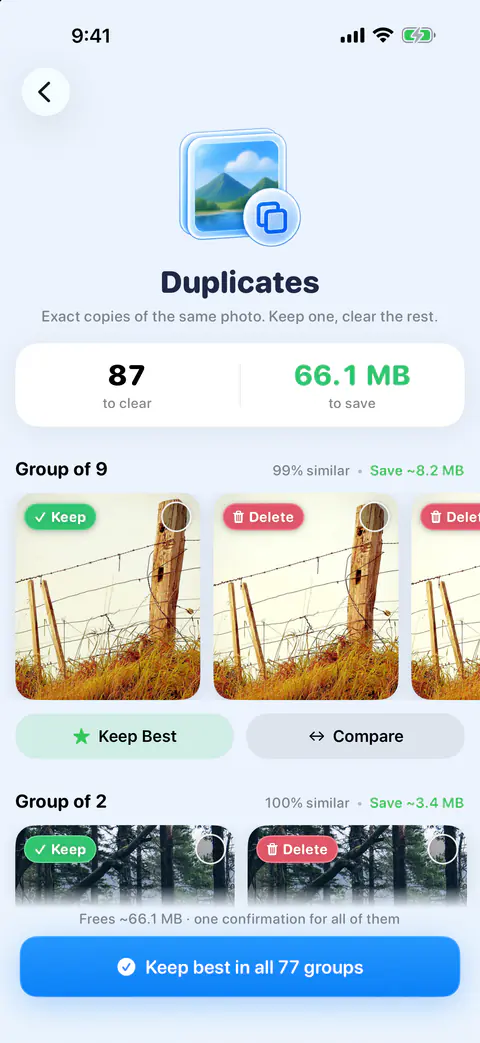
It helps with the pile Photos leaves for you. Similar shots, bursts and repeated screenshots. Every match is checked on your iPhone, and every set suggests the best photo to keep.
It helps when you want to see two copies side by side first. Compare shows two photos of a set split by a slider, with each one’s resolution and file size, and Keep left or Keep right deletes the other after you confirm.
It doesn’t beat Merge on exact copies Photos has already found. If the Duplicates collection shows your sets, Merge is free and built in (iPhone User Guide). Duplicates holds only exact copies of the same picture, confirmed by Apple’s on-device Vision. Photos of the same scene go to Similar shots instead.
It doesn’t make one-tap clearing free. Keep Best on a set is Pro: it keeps the suggested photo and deletes the rest after you confirm. Free users see a Pro badge on it and can still pick photos in a set to delete, or use Compare.
It doesn’t skip Recently Deleted either. Photos deleted in Keepable go to Recently Deleted in the Photos app. iOS gives apps no way to delete them for good straight away.
Questions and answers
Does the Duplicates album find duplicate videos too?
Yes. Apple says that starting with iOS 16 the Photos app detects duplicate photos and videos in your library and places them in the Duplicates album under Utilities.
Will merging on my iPhone delete the copies on my iPad and Mac too?
If you use iCloud Photos, yes. A photo deleted on one device is deleted on every device signed in to the same Apple Account, and the extra copies from a merge are deleted photos. The copy Photos keeps stays in your library.
How long does it take for the Duplicates album to appear?
Apple says it can be quick or take up to a few days. The check runs only while the iPhone is locked and connected to power, and it depends on the size of your library and what else is running.
Why does Duplicates show only a few sets when I know I have more?
Apple’s pages don’t say what the album counts as a duplicate. Ten shots of the same dinner are ten different photos, even when they look alike, so expect to sort those yourself or with a finder for similar shots.
Sources
What this page says about Keepable was checked against the app on .
- Apple Support, Merge duplicate photos and videos on iPhone — where Duplicates is on iOS 27 and the Merge steps (iPhone User Guide for iOS 27), read 13 Nov 2026
- Apple Support, Delete photos on your iPhone or iPad — merging one set or all sets, what Merge keeps, the extras going to Recently Deleted; published 31 March 2026, read 13 Nov 2026
- Apple Support, If you can’t find the Duplicates album for duplicate photos and videos on iPhone — iOS 16 and later, indexing needs the iPhone locked and on power, the status message in Library; published 15 Sept 2025, read 13 Nov 2026
- Apple Support, Duplicate and copy photos and videos on iPhone — the Duplicate command puts a copy next to the original (iPhone User Guide for iOS 27), read 13 Nov 2026
- WhatsApp Help Center, How to stop WhatsApp from saving media to your phone (iPhone) — Save to Photos is on by default, read 13 Nov 2026
Get Keepable
Keepable is free to use every day, and Keepable Pro is an optional upgrade.