
How this list was made
Every figure here comes from a page Apple publishes, read on 13 November 2026. Each one carries the page’s own date or edition, because Apple writes these pages at different times for different iPhones. Nothing is estimated, averaged or taken from another site. Where Apple gives a range, you get the range. Where Apple gives nothing, this page says so, further down.
Sizes vary with what is in the frame, so treat any single figure as a rough guide. Apple’s pages give most of them as approximate figures (Apple Support).
Photos: the only sizes Apple states
| Photo | Apple’s figure | Apple’s page, and its date |
|---|---|---|
| ProRAW at 12 MP | About 25 MB | About Apple ProRAW, 19 April 2024 |
| ProRAW at 48 MP | About 75 MB | About Apple ProRAW, 19 April 2024 |
| ProRAW against HEIF or JPEG | 10 to 12 times larger, and more at 48 MP | About Apple ProRAW, 19 April 2024 |
| HEIF against JPEG | Less space at the same visual quality, no percentage given | Using HEIF or HEVC media, 5 December 2025 |
The ProRAW page was written in 2024, for iOS 17. It is the only Apple page read for this list that gives a size for a single photo. Apple ProRAW is available on iPhone 12 Pro and later Pro models with iOS 14.3 or later.
What sets the size of an everyday photo is the resolution. On supported iPhone models the Main or Fusion camera saves 24 MP photos by default, and Settings, Camera, Formats, Photo Mode lets you choose 12 MP or 24 MP. To capture 48 MP photos, turn on Resolution Control or ProRAW & Resolution Control in Settings, Camera, Formats, depending on the iPhone model. Apple doesn’t say how many megabytes each of those makes. The photo size guide goes through the choice. For one photo at a time, see how big is an iPhone photo?.
Video: the per-minute figures
| One minute of | Apple’s figure | Apple’s page, and its date |
|---|---|---|
| 1080p, the default camera setting | About 70 to 105 MB | Compress a video on iPhone, 29 July 2026 |
| 720p (an iMovie export) | About 19 to 27 MB | Same page |
| 540p (an iMovie export) | About 12 to 16 MB | Same page |
| 360p (an iMovie export) | About 6 to 9 MB | Same page |
| 1080p at 30 fps | About 65 MB | iPhone User Guide, iOS 18.0 edition |
| Spatial video | About 130 MB | Same iOS 18.0 page |
These figures, and more formats, are in one table in iPhone photo and video sizes. Spatial video has a guide of its own.
Two things to know about this table. First, the current page’s figures are for exporting from iMovie, the way Apple suggests making a video smaller. Apple’s way to reduce the size of a recorded video on iPhone is to open it in iMovie and export it at a lower resolution, which may reduce quality. Second, the iOS 18 note is a guide entry that the iOS 26 and iOS 27 editions of the same page no longer carry (iPhone User Guide). Its 65 MB sits below the 70 to 105 MB range, and neither page explains the gap. Read both as ballpark figures.
ProRes is the outlier. Apple says ProRes files are up to 30 times larger than HEVC files. Apple’s ProRes page gives no size for a minute. It does set rules that show how heavy the files are (Apple Support):
- Recording ProRes needs at least 10 percent of the iPhone’s storage to be free, and with less than five minutes of recording time left the Camera app might free storage automatically.
- On 128 GB iPhones that support ProRes, it records at 1080p HD at 30 or 25 fps, while 256 GB and larger models can record ProRes in 4K at 30, 25 or 24 fps.
- ProRes at 4K 60 fps (iPhone 15 Pro and later Pro models) and 4K 120 fps (iPhone 16 Pro and later Pro models) needs an external drive writing at least 220 MB or 440 MB per second. Those are drive speeds. Apple doesn’t turn them into a size per minute.
The ProRAW and ProRes guide covers when those formats are worth it.
For a plan around long school events, see filming your kids’ games and recitals.
Phones and iCloud: how much room there is
On 2026-11-13 Apple’s iPhone page lists iPhone Duo, iPhone 18 Pro, iPhone Air, iPhone 17, iPhone 17e and iPhone 16 in its lineup. Their Tech Specs pages list these capacities:
| iPhone | Capacities Apple lists |
|---|---|
| iPhone Duo | 256GB, 512GB, 1TB or 2TB |
| iPhone 18 Pro and 18 Pro Max | 256GB, 512GB, 1TB or 2TB |
| iPhone Air | 256GB, 512GB or 1TB |
| iPhone 17 | 256GB or 512GB |
| iPhone 17e | 256GB or 512GB |
| iPhone 16 | 128GB, 256GB or 512GB |
You never get all of it. Apple’s iPhone Tech Specs pages say available space is less than the listed capacity and varies due to many factors, and that storage capacity is subject to change. Apple’s Tech Specs page for the iPhone 17, introduced in 2025, lists 256GB and 512GB capacities and says a standard configuration uses about 12GB to 24GB of that space. Apple’s newer iPhone Tech Specs pages say Apple Intelligence on-device models use approximately 7GB of space and can be deleted if Apple Intelligence is turned off.
In iCloud, the free tier is small. Every iCloud account comes with 5 GB of free storage. The iCloud+ plans offer 50 GB, 200 GB, 2 TB, 6 TB or 12 TB of storage for photos, files, backups and more. The storage size guide turns these into a choice.
For a worked example, see how much storage 10,000 photos need.
What Apple doesn’t publish
None of the Apple pages read for this list gives these figures:
- An everyday photo. No size for a HEIF or JPEG photo at 12, 24 or 48 MP. The only per-photo sizes are ProRAW’s (About Apple ProRAW).
- A Live Photo. With Live Photos, the iPhone records what happens 1.5 seconds before and after you take a picture, and Live Photo is on by default. Apple gives no file size for one.
- A burst. Apple’s guide explains how Burst mode works, with no size and no count of shots (iPhone User Guide).
- A minute of 4K, or of each Record Video setting, on Apple’s web pages. Apple says faster frame rates and higher resolutions result in larger video files; the formats and frame rates are chosen in Settings, Camera, Record Video. The guide stops there, with no sizes (iPhone User Guide). The 4K video guide has more, and every video setting explained goes through each choice.
- A minute of ProRes. Only the “up to 30 times larger” ratio (Apple Support).
- How much HEIF saves. Apple says it uses less space than JPEG, and gives no percentage (Apple Support).
So when a site gives you a set size for a normal photo or a minute of 4K, that figure is not from any Apple page read here.
See the real numbers on your own phone
Your phone can tell you what Apple’s pages don’t.
- One photo or video. Open it in Photos, then swipe up or tap the Info button. Apple lists file size among the details (iPhone User Guide). For a video, Apple says the size shows under the name of the device that recorded it (Apple Support).
- Your own minute of video. Record exactly one minute at the setting you normally use, then check its size the same way. That is your per-minute figure, for your phone and your setting.3. Your whole library. To check iPhone storage, go to Settings, General, iPhone Storage, where the available storage is shown at the top of the screen. In iPhone Storage, Photos means the photos and videos stored in the Photos app, and Messages means messages and their attachments.
One catch if you use iCloud Photos. With Optimize iPhone Storage on, full-resolution photos and videos are stored in iCloud in their original formats and storage-saving versions are kept on the iPhone; the setting is on by default. So the Photos figure in iPhone Storage can be smaller than the full size of your library in iCloud.
To find your biggest files, see which photos and videos take the most space.
Where Keepable helps, and where it doesn’t
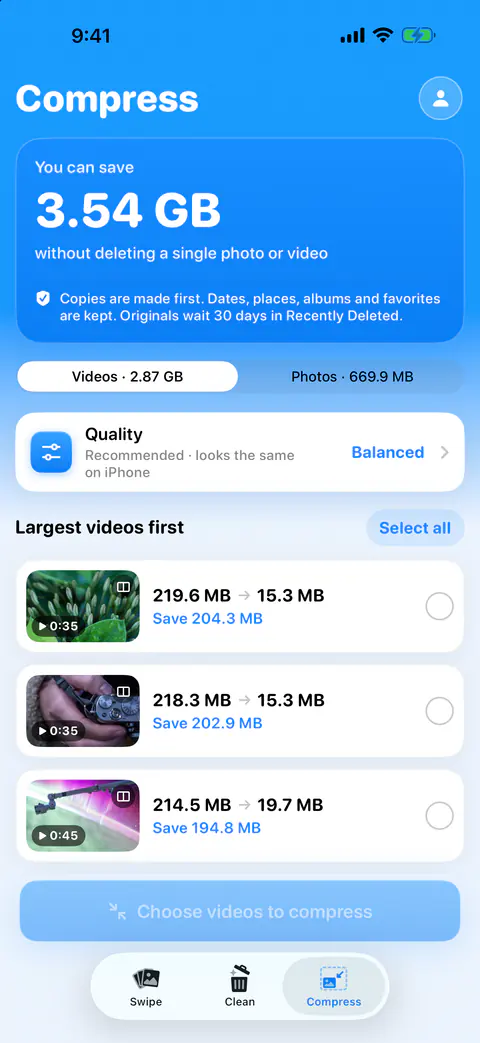
It helps you find the big, old files without checking them one by one. Large and old lists photos over 8 MB and videos over 100 MB taken more than 18 months ago. Favorites and photos you kept stay out.
It helps you shrink what you keep, and see the result first. Compression offers three choices: Best quality, which looks visually identical, Balanced, the recommended one that looks the same on iPhone, and Smallest, with some softness up close. After a run, a results sheet shows each item before and after, and why any were skipped. Nothing is replaced until you confirm, and then iOS asks you to confirm too. You can also throw the copies away and keep every original.
It doesn’t compress what is only in iCloud. Items stored only in iCloud aren’t counted or compressed. Download them in Photos to compress them.
It doesn’t change what the camera saves next. That is up to your Camera settings. In Settings, Camera, Formats, choosing Most Compatible makes all new photos and videos use JPEG or H.264; choosing High Efficiency returns to the space-saving HEIF and HEVC formats.
Questions and answers
How many MB is a normal iPhone photo?
Apple’s support pages give no size for an everyday HEIF or JPEG photo. Its only per-photo figures are for ProRAW: about 25 MB at 12 MP and about 75 MB at 48 MP. Open one of your own photos in Photos and swipe up: the details list its file size.
How much space does one minute of video take on iPhone?
Apple’s page on compressing video puts one minute at 1080p, the camera’s default, at about 70 to 105 MB. An older iOS 18 guide gave about 65 MB for 1080p at 30 fps. Apple’s pages give no per-minute size for 4K. Record one minute on your own phone and check its size to get your number.
Why is my iPhone’s free space smaller than its capacity?
Apple’s Tech Specs pages say available space is less than the listed capacity and varies due to many factors. On the newest models they say a standard configuration takes about 12GB to 24GB, and that Apple Intelligence models use about 7GB.
Sources
What this page says about Keepable was checked against the app on .
- Apple Support, About Apple ProRAW — ProRAW sizes at 12 MP and 48 MP, and 10 to 12 times larger than HEIF or JPEG; the page is dated 19 April 2024, read 13 Nov 2026
- Apple Support, Using HEIF or HEVC media on Apple devices — HEIF and HEVC use less space than JPEG and H.264, with no percentage; the page is dated 5 December 2025, read 13 Nov 2026
- Apple Support, Compress a video on iPhone — one-minute sizes at the iMovie export resolutions, and where Photos shows a video’s file size; the page is dated 29 July 2026, read 13 Nov 2026
- Apple, iPhone User Guide for iOS 18 (18.0 edition), Take spatial photos and record spatial videos — one minute of spatial video against one minute of 1080p at 30 fps; the iOS 26 and iOS 27 editions dropped the note, read 13 Nov 2026
- Apple Support, About Apple ProRes on iPhone — ProRes up to 30 times larger than HEVC, the free-space rule and the 128 GB limit; the page is dated 10 November 2026, read 13 Nov 2026
- Apple, iPhone User Guide, Record a video with your iPhone camera — faster frame rates and higher resolutions make larger files, with no sizes given (iOS 27 guide), read 13 Nov 2026
- Apple, iPhone User Guide, See photo and video information on iPhone — the Info details include file size (iOS 27 guide), read 13 Nov 2026
- Apple, iPhone User Guide, Capture action shots with Burst mode — how Burst mode works, with no size or count given (iOS 27 guide), read 13 Nov 2026
Get Keepable
Keepable is free to use every day, and Keepable Pro is an optional upgrade.