
What Photos can and can’t show you
Start with the limit, so you don’t hunt for a button that isn’t there. Apple’s guide gives two ways to sort the library: by the date items were added, and by the date they were taken (Apple). There is no sort by size.
What Photos does show is one item’s size at a time. Open a video and tap the Information button. Apple says the file size appears under the name of the device that recorded it, along with other technical details (Apple Support). Apple’s page describes this for videos; open the panel on a photo to see what your phone lists for it.
So the method is: find the kinds of items that run large, then check sizes only on those. For one photo’s size, see how to see a photo’s file size on iPhone.
The heavy kinds, by Apple’s own numbers
Apple publishes very few file sizes. These are the ones it does give, and they tell you where to look.
| Item | What Apple says about its size |
|---|---|
| One minute of video at 1080p, the default | About 70 to 105 MB (Apple Support) |
| Video at a higher resolution or frame rate | Larger files, with no figure given (Apple) |
| ProRes video, on Pro models | Up to 30 times larger than HEVC (Apple Support) |
| A ProRAW photo, on Pro models | About 25 MB at 12 MP and about 75 MB at 48 MP (Apple Support) |
| ProRAW against an ordinary photo | 10 to 12 times larger than HEIF or JPEG (Apple Support) |
| An ordinary HEIF or JPEG photo | No size published |
| A Live Photo | No size published |
Every format Apple does size is in iPhone photo and video sizes.
Read the table as an order of search. Long videos first, then anything shot in ProRes or ProRAW. Ordinary photos come last. By Apple’s own figures, even a 12 MP ProRAW photo, at 10 to 12 times the size of an ordinary one, is well under one minute of 1080p video.
Find the videos fast
- Open Photos, go to the Library, and use the Media Types filter to show only videos (Apple).
- Scroll and look for long ones. Each video’s length is a fair guide to its size at the same settings.
- Open a likely one, tap Information, and note the size (Apple Support).
You can also type Video in the search field: Apple says a media type in the search narrows the results (Apple). Add a place or a year to find that holiday you filmed for an hour.
The guide to finding large videos goes further, with what to do about the long ones you want to keep.
Find the pro formats
If you have a Pro iPhone and ever turned on ProRAW or ProRes, those files can dwarf everything else. Apple ProRAW is available on iPhone 12 Pro and later Pro models with iOS 14.3 or later. Apple ProRes recording needs iOS 15.1 or later and an iPhone 13 Pro, 13 Pro Max or a later Pro model, up to iPhone 18 Pro and iPhone 18 Pro Max.
Media Types groups items by kind, such as Portrait photos or time-lapse videos (Apple). Apple’s iPhone guide doesn’t list every type it shows, so scroll the list on your own phone and look for a RAW entry. Then check a few sizes with Information. For what each format costs, see ProRAW and ProRes.
Tip: pin the media type you check most. Apple’s guide shows how to add it to the Pinned collection (Apple).
Other places big videos hide
The video filter shows your Library. A few kinds of video are easy to miss there.
- Screen recordings. Screen recordings are saved automatically to the photo library and are grouped under Collections, Media Types, Screen Recordings. A long recording of a game or a call is a full video.
- Videos saved from other apps. The Recently Saved collection shows photos and videos saved from other apps such as Messages, Safari and Mail, and items received by AirDrop. Clips saved from a chat or a website land here.
- Hidden videos. Hidden photos and videos move to the Hidden album and do not appear anywhere else in Photos, including the Library, other albums and the Photos widget. Check Hidden under Utilities in Collections.
- Slow motion and time-lapse. Slo-mo records at 1080 HD at 240 fps from the back camera and 1080 HD at 120 fps from the front camera by default; supported models also offer 4K at 120 fps. Apple says faster frame rates make larger files (Apple). Look for them in Media Types. Sizes are in slow-motion video size and how much space a time-lapse takes.
Check the whole library’s size
One number tells you whether the photo hunt is worth it at all. Open Settings, tap General, then tap iPhone Storage, and see where Photos sits in the list (Apple Support). If it is small next to Messages or an app, start there instead, as the guide on what to delete first explains. If iPhone Storage never finishes loading, see this fix.
Where Keepable helps, and where it doesn’t
It helps because it reads the sizes for you. Biggest first puts your videos and large photos in one deck, largest first. The Compress tab lists photos over 1 MB and videos over 20 MB.
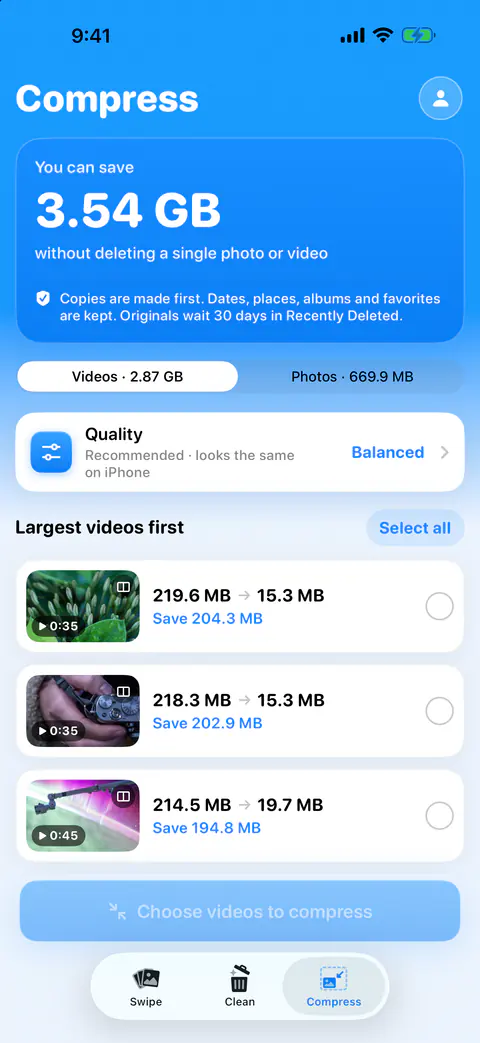
It helps you find big, old items in one list. Large and old lists photos over 8 MB and videos over 100 MB taken more than 18 months ago. Favorites and photos you kept stay out.
It doesn’t read photos that are only in iCloud. Scans, matching and compression work only on photos and videos already on the iPhone. Keepable doesn’t download originals from iCloud to scan them. With Optimize iPhone Storage on, the full-size originals live there (Apple).
Questions and answers
Can I sort my iPhone photos by file size?
Not in the Photos app. Apple’s guide lists two sort orders for the library: by the date items were added and by the date they were taken. To find big items, filter or browse by type and check sizes one at a time, or use an app that reads sizes for you.
How do I see the file size of a photo or video on iPhone?
Open the item in Photos and tap the Information button. Apple’s video page says the file size appears under the name of the device that recorded the video, along with other technical details.
Are Live Photos big?
Apple doesn’t give a size. It says a Live Photo records what happens 1.5 seconds before and after the shot, including the audio. Check one in the Information panel if you want to know what yours take.
Sources
What this page says about Keepable was checked against the app on .
- Apple, iPhone User Guide, Sort and filter the photo library on iPhone — the two sort orders (Added, Captured) and the Media Types filter, read 13 Nov 2026
- Apple Support, Compress a video on iPhone — where Photos shows a video’s file size, and approximate sizes of one minute of video; published 29 Jul 2026, read 13 Nov 2026
- Apple, iPhone User Guide, Record a video with your iPhone camera — faster frame rates and higher resolutions make larger files, read 13 Nov 2026
- Apple Support, About Apple ProRAW — ProRAW file sizes at 12 MP and 48 MP and against HEIF or JPEG; published 19 Apr 2024, read 13 Nov 2026
- Apple Support, About Apple ProRes on iPhone — ProRes files against HEVC; published 10 Nov 2026, read 13 Nov 2026
- Apple, iPhone User Guide, Locate photos and videos by media type on iPhone — Collections, Media Types, and pinning a media type, read 13 Nov 2026
- Apple Support, How to check the storage on your iPhone and iPad — the iPhone Storage list and its Photos category; published 13 Oct 2026, read 13 Nov 2026
- Apple, iPhone User Guide, Back up and sync your photos and videos with iCloud — Optimize iPhone Storage keeps the originals in iCloud, read 13 Nov 2026
- Apple, iPhone User Guide, Search for photos and videos on iPhone — narrowing a search with a media type such as Video, read 13 Nov 2026
Get Keepable
Keepable is free to use every day, and Keepable Pro is an optional upgrade.