
Who is comparing, and how
This site is written by Loopware LLC, the maker of Keepable. We make a cleaner app, so we have a stake in this question. This page tries to answer it straight.
Comparison pages compare what each app says about itself on its App Store page, its privacy label and its own help pages, read on the date shown on the page. Apple’s side comes from Apple’s support pages, read on 13 November 2026 (Apple Support). Keepable’s side comes from its facts.
What the Duplicates album does
Since iOS 16, the Photos app detects duplicate photos and videos and places them in the Duplicates album under Utilities. Duplicate detection needs the iPhone to be locked and connected to power, and it can finish quickly or take up to a few days depending on the library size and background tasks. If the Duplicates collection does not appear, Photos has not found any duplicates in the library.
To clear it, Apple’s steps (Apple Support):
- Open Photos, then tap Collections at the bottom.
- Swipe up, then tap Duplicates under Utilities.
- Tap Merge on a set. For all of them, tap Select, then Select All, then Merge.
- Confirm with Merge and the number of items.
When you merge duplicate photos, iPhone combines the highest image quality and relevant data into one photo kept in the library, and the other duplicates move to Recently Deleted. If you’re unsure about deleting them at all, read is it safe to delete duplicate photos?.
When the album is all you need
Use Photos alone, and skip the app, if this sounds like you:
- The same pictures came in twice, from a restore, an import or a chat you saved from.
- You want copies gone, and you are happy to judge everything else yourself.
- You would rather not give another app access to your photos.
- You have a Mac too. On a Mac, duplicates appear automatically in the Duplicates collection under Utilities in the Photos sidebar, and they can take some time to appear while Photos analyzes the library.
Merging is free, built in and takes a few taps. For plain copies, an app adds little.
What the album leaves to you
Apple’s pages describe the Duplicates album as finding duplicate photos and videos (Apple Support). They don’t describe these, which are often what fills a camera roll:
- Look-alike shots. Five tries at the same group photo are not copies. For bursts, Photos has its own picker: To keep shots from a burst, open it and tap the circle on each photo you want to save as an individual photo; gray dots mark the photos suggested to keep.
- Screenshots. Screenshots are saved automatically to the photo library and are grouped under Collections, Media Types, Screenshots. You can open that view and select by hand.
- Big old videos. The Media Types filter in the library shows only photos, videos or screenshots, and several filters can be applied at the same time. The photo library can be sorted by the date items were added or by the date they were taken. Finding the biggest ones takes longer; see find large videos on iPhone.
- Blurry and low-quality shots. Look for them as you scroll the Library.
All of these can be done in Photos by hand. A cleaner app’s job is to gather them so you decide faster.
Side by side
| Topic | The Duplicates album | Keepable |
|---|---|---|
| What counts as a duplicate | Duplicate photos and videos (Apple Support). | Duplicates holds only exact copies of the same picture, confirmed by Apple’s on-device Vision. Photos of the same scene go to Similar shots instead. Photos are compared at any size within the same shape, so a resized copy, such as a photo saved back from WhatsApp, meets its original. Portrait and landscape, or 4:3 and 16:9, are never compared. |
| Look-alike shots | Not described on Apple’s pages (Apple Support). | Similar shots, bursts and repeated screenshots. Burst extras keeps the pick of each burst, the one you or iOS chose, and selects the rest for you to delete. You can change anything before you delete. |
| Which one stays | Merge combines the best quality and the relevant data into one photo (Apple Support). | The suggested keeper’s reason is named, such as Highest resolution, Favorite, Edited or Has a location, and for similar shots what the picture shows: Eyes open, Sharpest, Not cut off or Best light. Keep Best on a set is Pro: it keeps the suggested photo and deletes the rest after you confirm. Free users see a Pro badge on it and can still pick photos in a set to delete, or use Compare. |
| How long before results | Up to a few days, with the iPhone locked and charging (Apple Support). | The first scan ends with one result, such as Ready to clear and worth a look up to, and a first step like Clear duplicates with the space it saves. The deeper duplicate scan carries on in the background. |
| Where the extras go | Recently Deleted (Apple Support). | Photos deleted in Keepable go to Recently Deleted in the Photos app. iOS gives apps no way to delete them for good straight away. |
| Cost | Free, part of Photos (Apple Support). | Free gives you your first 500 deletes, then 25 a day, and 25 compressions a month. |
| Other devices | On a Mac, duplicates appear automatically in the Duplicates collection under Utilities in the Photos sidebar, and they can take some time to appear while Photos analyzes the library. | Keepable runs on iPhone. |
Use both, in this order
The two don’t compete. Run Apple’s merge first: it clears true copies for free and keeps the best data from each set. Then, if the phone is still full, use a cleaner for look-alikes, screenshots and big videos. Either way the space comes back only once Recently Deleted is emptied. Photos and videos you delete in the Photos app go to the Recently Deleted album for 30 days, and after 30 days they are permanently deleted.
Other apps that find duplicates, and how each picks a keeper, are in duplicate photo finders compared.
Where Keepable helps, and where it doesn’t
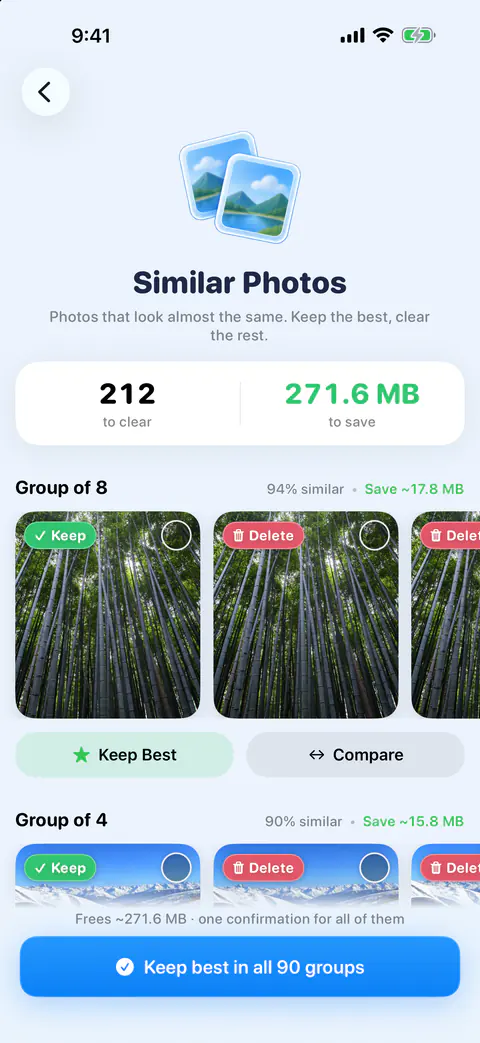
It helps when the clutter is look-alikes, not copies. Similar shots, bursts and repeated screenshots. Each set shows its photos in a row with the suggested keeper first, how similar they are as a percentage, and roughly what clearing the set saves.
It helps when you want to see why one is kept. The suggested keeper’s reason is named, such as Highest resolution, Favorite, Edited or Has a location, and for similar shots what the picture shows: Eyes open, Sharpest, Not cut off or Best light.
It doesn’t beat Apple for plain copies. Merge is free and keeps the best data from each set (Apple Support).
It doesn’t pick the keeper for free in one tap. Keep Best on a set is Pro: it keeps the suggested photo and deletes the rest after you confirm. Free users see a Pro badge on it and can still pick photos in a set to delete, or use Compare.
Questions and answers
Why is there no Duplicates album in my Photos app?
Apple says the album appears only once your iPhone has found duplicates. Finding them needs the iPhone locked and charging, and can take up to a few days for a big library. If it never appears, Photos has found no duplicates.
Does Merge delete the other copies for good?
Not at once. Apple says the other duplicates move to Recently Deleted, where photos stay for 30 days before they are permanently deleted. Empty that album to get the space back sooner.
Do I still need a cleaner app if I use the Duplicates album?
Only if your problem is bigger than copies. If what fills your phone is bursts, near-identical shots, screenshots or long videos, the Duplicates album won’t list them. Ready to clear holds duplicates, similar shots, similar videos, similar screenshots, old screenshots and burst extras. Worth a look holds blurry, large and old, selfies, documents and receipts, whiteboards and parking, and chat media.
Sources
What this page says about Keepable was checked against the app on .
- Apple Support, Delete photos on your iPhone or iPad — Duplicates, Merge and what happens to the copies; the page is dated 31 March 2026, read 13 Nov 2026
- Apple Support, If you can’t find the Duplicates album for duplicate photos and videos on iPhone — how long detection takes and what it needs; the page is dated 15 September 2025, read 13 Nov 2026
Get Keepable
Keepable is free to use every day, and Keepable Pro is an optional upgrade.