
What counts as a duplicate
A duplicate here is the same picture twice, not two shots of the same moment. The listing puts it this way: Duplicates and near-duplicates, including resized copies. The near-duplicates live in their own pile, Similar shots, so the two are never mixed up.
Size doesn’t hide a copy, but shape does. Photos are compared at any size within the same shape, so a resized copy, such as a photo saved back from WhatsApp, meets its original. Portrait and landscape, or 4:3 and 16:9, are never compared. So a photo you saved back from a chat finds its original, while a crop usually doesn’t. The guide to duplicates from WhatsApp and saved images covers where those copies come from.
Reading a set
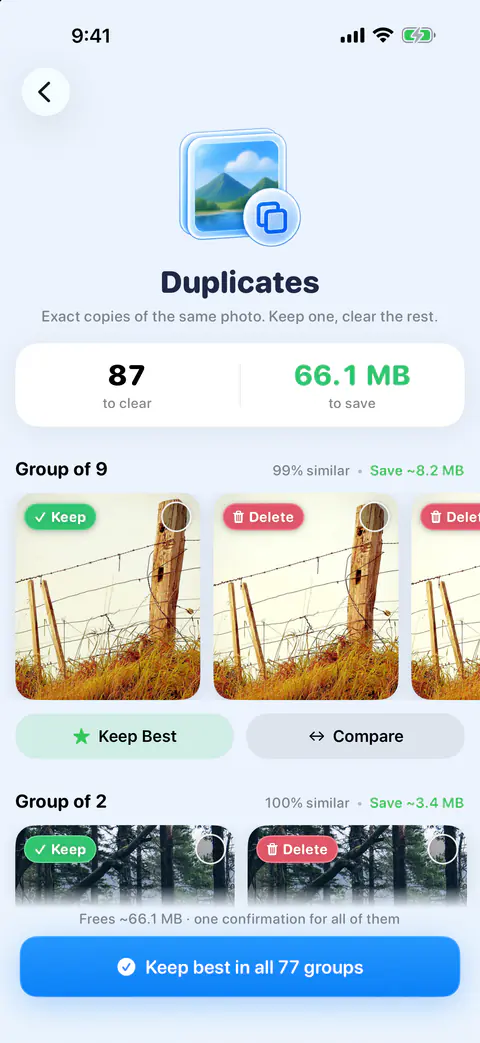
The top of the screen counts what can go and what it saves. Each set shows its photos in a row with the suggested keeper first, how similar they are as a percentage, and roughly what clearing the set saves.
The copy marked Keep comes with a reason, so you can check the choice instead of trusting it. The suggested keeper’s reason is named, such as Highest resolution, Favorite, Edited or Has a location, and for similar shots what the picture shows: Eyes open, Sharpest, Not cut off or Best light. When nothing in the pictures tells a set apart, Keepable says All look good: keep any one, instead of inventing a reason.
Clearing duplicates on the free plan
- Open the Clean tab and tap Duplicates.
- In each group, check the copy marked Keep.
- Pick the copies you want gone and delete them, or tap Compare to check two copies against each other.
- Confirm the delete.
Keep Best on a set is Pro: it keeps the suggested photo and deletes the rest after you confirm. Free users see a Pro badge on it and can still pick photos in a set to delete, or use Compare. Each copy you delete counts toward the free allowance. Free gives you your first 500 deletes, then 25 a day, and 25 compressions a month.
Before a batch delete in the Clean screens, Keepable warns you when it includes favorites or photos in a shared album.
Keep best, one set or all of them, on Pro
On Pro, the Keep Best button under each group does the picking for you. Keepable Pro adds unlimited deletes and compressions, compress everything at once, keep the best in one tap, and the private vault. For a big library there is a bigger button. Keep best in all groups, a Pro action, keeps the best shot in every group with one confirmation, then one iOS prompt. The rest wait in Recently Deleted for 30 days.
The finder itself is on both plans; the one-tap clearing is what Pro adds. The free plan includes swipe review, every cleanup finder, contacts cleanup and widgets. The free and Pro page lists the rest.
Duplicates in other parts of the app
- The Likely junk deck. Likely junk gathers the extra copies from exact duplicate sets, never the copy Keepable would keep, then the blurriest photos, and it arrives already marked: swipe right to keep one.
- The Duplicate Found widget. Duplicate Found shows two near-identical photos from your library, and what clearing them frees.
Photos already has a Duplicates album
Before you use any app for this, look at what Photos does on its own. Apple’s steps: open Photos, tap Collections, then Duplicates under Utilities, and tap Merge on a set (Apple Support). Apple says a merge keeps one photo with the highest image quality and relevant data, and the other copies move to Recently Deleted (Apple Support). The album only appears when Photos has found duplicates.
For many libraries that is enough, and it costs nothing. The Duplicates album vs a cleaner app page sets the two side by side, and what Merge does explains the merge itself.
What the duplicate finder does not do
- It doesn’t know who is in a photo. The best-shot check only finds where faces are and whether eyes are open, on the iPhone. Nothing in it recognises or compares who is in a photo.
- It doesn’t count iCloud-only files. Files stored only in iCloud are left out of the you-can-free figure, because deleting them frees nothing on the iPhone. The Clean tab shows their size apart, next to your iPhone’s free and total storage.
Where Keepable helps, and where it doesn’t
It helps when you want a reason before you delete, not just a pile. Every match is checked on your iPhone, and every set suggests the best photo to keep. The duplicate photos guide walks through the app way and the Photos way.
It doesn’t clear every set in one tap on the free plan. Keep Best on a set is Pro: it keeps the suggested photo and deletes the rest after you confirm. Free users see a Pro badge on it and can still pick photos in a set to delete, or use Compare. The Duplicates album in Photos merges every set for free, with Select All (Apple Support).
Questions and answers
Is Keep Best free?
No. Keep Best on a set is Pro: it keeps the suggested photo and deletes the rest after you confirm. Free users see a Pro badge on it and can still pick photos in a set to delete, or use Compare.
Will it match a photo I cropped?
Not as a duplicate. Photos are compared at any size within the same shape, so a resized copy, such as a photo saved back from WhatsApp, meets its original. Portrait and landscape, or 4:3 and 16:9, are never compared. A crop usually changes the shape, so it is not paired with the original.
How is this different from the Duplicates album in Photos?
Apple’s page says Merge keeps one photo with the highest image quality and relevant data and sends the other copies to Recently Deleted. It is free and built in. The suggested keeper’s reason is named, such as Highest resolution, Favorite, Edited or Has a location, and for similar shots what the picture shows: Eyes open, Sharpest, Not cut off or Best light.
Sources
What this page says about Keepable was checked against the app on .
- Apple Support, Delete photos on your iPhone or iPad — the Duplicates album, Merge and what it keeps, and Recently Deleted; the page is dated 31 March 2026, read 13 Nov 2026
- Apple Support, Merge duplicate photos and videos on iPhone — where the Duplicates collection sits in Photos on iOS 27, read 13 Nov 2026
Get Keepable
Keepable is free to use every day, and Keepable Pro is an optional upgrade.