
Set a photo aside without losing your place
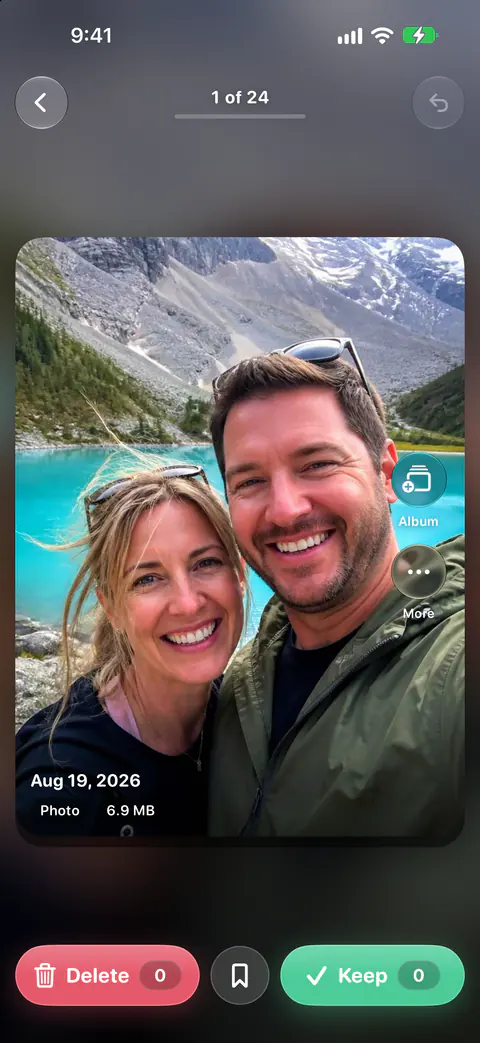
Speed is what makes swiping work, and one hard photo can stall a whole session. The middle button is for that photo. Between Delete and Keep sits a Decide later button that saves the photo to Decide later and shows the next one. Decide later is free for everyone.
It waits on the Decide later list until you come back to it.
Pick when to come back
Decide later keeps photos to come back to, free for everyone, with one-tap reminders for Tonight, Tomorrow, This Weekend or Next Week, or a custom time. Tonight means 8 pm, Tomorrow 9 am, This Weekend Saturday at 10 am and Next Week Monday at 9 am.
Reminders you set are yours, so the app’s limits on its own notifications don’t block them. At most one notification a day, and never at night. Reminders you set yourself still come at the time you chose.
Keep the list in sight
Two widgets keep the photos you set aside in view, so they don’t get forgotten:
- The Decide Later widget shows photos you bookmarked to come back to, soonest reminder first.
- The Reminder widget shows the photo you asked to be reminded about, and when, on the Home Screen or the Lock Screen.
Apple’s guide covers adding a widget to the Home Screen or the Lock Screen (Apple Support). The widgets page lists the rest.
Other ways in
- The camera. Keepable asks for the camera only to capture photos and videos for your Vault and Bookmarks, and for the microphone only to record sound with those videos. Bookmarks is the old name for Decide later.
- A keyboard. With a hardware keyboard, the arrow keys work in swipe review: left marks to delete, right keeps, down saves to Decide later and up opens Album. Command-Z undoes and Escape goes back.
- VoiceOver. With VoiceOver, each photo in swipe review offers Keep Photo, Delete Photo, Decide Later and Add to Album actions, and reads the photo’s type, date, place and position in the deck.
What Decide later does not do
- It doesn’t decide for you. The photos wait until you keep or mark them. Nothing is deleted without your review. A swipe only marks a photo; you confirm every batch.
- It doesn’t follow you to a new iPhone. The list stays on this phone. Keepable keeps its index, settings and vault on the iPhone and uses no iCloud sync. Its only special entitlement is an app group shared with its widgets.
Where Keepable helps, and where it doesn’t
It helps when one hard photo would otherwise end a session. Between Delete and Keep sits a Decide later button that saves the photo to Decide later and shows the next one. Decide later is free for everyone. The guide on how to decide which photos to keep has questions to ask yourself when you come back.
It doesn’t make the choice easier, only later. Decide later keeps photos to come back to, free for everyone, with one-tap reminders for Tonight, Tomorrow, This Weekend or Next Week, or a custom time.
Questions and answers
Is Decide later a Pro feature?
No. Decide later keeps photos to come back to, free for everyone, with one-tap reminders for Tonight, Tomorrow, This Weekend or Next Week, or a custom time.
Will a Decide later reminder come at night?
Only if you set it for then. At most one notification a day, and never at night. Reminders you set yourself still come at the time you chose.
Sources
What this page says about Keepable was checked against the app on .
- Apple Support, Add, edit, and remove widgets on iPhone — adding widgets to the Home Screen and Lock Screen (iPhone User Guide for iOS 27), read 13 Nov 2026
Get Keepable
Keepable is free to use every day, and Keepable Pro is an optional upgrade.