
How the dozen is chosen
You don’t pick the photos, and that is the point: the hardest part of a clean-up is deciding where to start. The mix decides for you, in a fixed order. Today’s mix holds 12 photos, picked once a day from what you haven’t reviewed: this date in past years first, then what’s new since yesterday, then old screenshots, then your oldest photos.
It never asks about a photo twice. Today’s mix and the one-tap decks only draw on photos you haven’t kept or marked yet.
Old screenshots are in there on purpose, since many are only useful for a short while. Screenshots older than 30 days join today’s mix and the Old screenshots pile on the Clean tab. When one comes up, you can set a timer instead of deciding now. When a screenshot comes up, Keep for… lets you keep it a week, a month or always, or delete it now. When the time is up it comes back in your mix. Nothing deletes itself.
A short session that simply ends
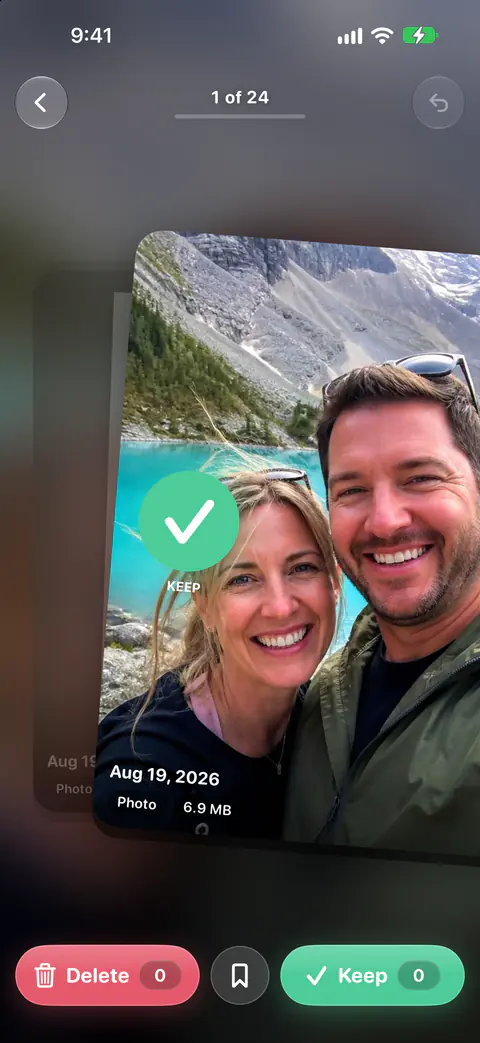
You swipe the mix like any deck: right to keep, left to mark. Every 30 photos a deck or month pauses on a checkpoint card with Keep going and Done for today. Today’s mix is short and simply ends. When the last photo is done, so are you for the day.
Marked photos don’t vanish when the mix ends. Photos you swipe left wait in Marked on the Swipe tab until you review them in Ready to delete. You can clear them now or let a few days collect first; see Ready to delete.
The daily reminder, and how to quiet it
The daily notification for today’s mix comes at 7 pm unless you pick another time in You, Notifications. At most one notification a day, and never at night. Reminders you set yourself still come at the time you chose. Once you have swiped on a given day, Keepable sends you no more notifications that day.
Nothing is switched on behind your back. Keepable doesn’t ask for notifications when you first open it. It asks when you turn a notification on, tap Remind me on the card after a delete, or ask for a reminder before a trial ends. Cleanup reminders, a nudge after a few days away, are off unless you turn them on.
To turn the mix reminder off, or any other kind, open You, then Notifications. You, Notifications has a switch for each kind: Today’s mix, Cleanup reminders, Storage tips, Streak nudges, Monthly review, Quota reset, Milestone celebrations, Setup help, Year-end recap and Trial ending.
The mix on your Home Screen
Two widgets put photos from the mix where you’ll see them.
- On This Day shows photos from this date in past years, or today’s mix on days without any.
- Keep or Delete shows one photo at a time from today’s mix with Keep and Delete buttons on the widget itself. Marked photos wait in Keepable until you review them. It needs iOS 17 or later.
To add one, Apple’s steps are: touch and hold the Home Screen background until the apps jiggle, choose Add Widget, find the widget, swipe to the size you want, then tap Add Widget (Apple Support). The widgets page lists the others.
The streak counts days, not deletes
A streak for the days you show up, not for how much you delete. Your streak counts any day you swipe at least one photo, keep or delete, and starts again from one after a day you miss.
That matters on days when every photo is a keeper. You still showed up, and the streak says so.
What Today’s mix does not do
- It doesn’t change size. There is no setting for a bigger or smaller mix. Today’s mix holds 12 photos, picked once a day from what you haven’t reviewed: this date in past years first, then what’s new since yesterday, then old screenshots, then your oldest photos.
- It doesn’t follow you to a new iPhone. Your streak and settings stay on this phone. Keepable keeps its index, settings and vault on the iPhone and uses no iCloud sync. Its only special entitlement is an app group shared with its widgets.
- It doesn’t delete anything by itself. Nothing is deleted without your review. A swipe only marks a photo; you confirm every batch.
Where Keepable helps, and where it doesn’t
It helps when a big clean-up never gets started. About two minutes. One notification a day at the time you choose, or none. The 12-a-day method explains why a small daily habit works.
It helps you look back as well as clear out. On This Day shows photos from this date in past years, or today’s mix on days without any. The On This Day guide shows other ways to look back.
It doesn’t rescue a phone that is full tonight. A dozen photos a day is a habit, not a rescue. Free up space asks how much you need, 1, 5 or 10 GB or all of it, and answers with the shortest list of steps across the Clean piles and Compress, each step opening its screen. See the free-up estimate.
Questions and answers
Can I move the daily reminder to another time?
Yes. The daily notification for today’s mix comes at 7 pm unless you pick another time in You, Notifications. About two minutes. One notification a day at the time you choose, or none.
Do I break my streak if I only keep photos that day?
No. Your streak counts any day you swipe at least one photo, keep or delete, and starts again from one after a day you miss.
Is Today’s mix part of the free plan?
Yes. The free plan includes swipe review, every cleanup finder, contacts cleanup and widgets. Deleting is what the free plan counts. The free daily deletes are shared by swipe review and the Clean tab.
Sources
What this page says about Keepable was checked against the app on .
- Apple Support, Add, edit, and remove widgets on iPhone — how to add a widget to the Home Screen and the Lock Screen (iPhone User Guide for iOS 27), read 13 Nov 2026
Get Keepable
Keepable is free to use every day, and Keepable Pro is an optional upgrade.